Reads new messages
In the personal chats you allow, from the moment you connect it.
Telegram secretary
Your Claude or ChatGPT reads new messages in the personal chats you allow, finds who's waiting for an answer and drafts replies. It sends only what you approve — from your name.
Connected through Telegram's Chat Automation. Telegram Premium isn't needed.
Three chats are waiting for your answer:
Which ones shall I send? They'll go out from your name, and only the ones you approve.
It works inside your own Telegram account — your chats, your contacts, your name. Nothing goes out until you say so.
In the personal chats you allow, from the moment you connect it.
Shows the chats where the last word is the other person's, newest first — so nobody gets lost.
Russian, Uzbek, English — each reply is written in the language of that conversation.
From your name, in chats with an incoming message in the last 24 hours.
Switch them on in the dashboard or the app: Telegram → Auto-replies. Replies go from your name and only to the chats you allowed.
“price, cost” → your price list with a link, “address” → the address and a map. Works like Instagram auto-replies.
“Can't answer right now — I'll write in the evening”: only to new people, once to everyone, once a day, or at the start of every conversation. It never cuts into a conversation already going.
You wrote in a chat — yourself or through your AI — the bot keeps quiet there for 1 to 48 hours and never steps into a live conversation.
Work days and hours in your time zone: you answer during the day, the bot in the evenings and on days off.
You'll need an Ai Xodim account and an AI app connected through the AI connector.
Sign in at ai-xodim.uz or in the app, open “Telegram” and follow the one-time link. The bot @aixodimuzbot links your Telegram to your Ai Xodim account.
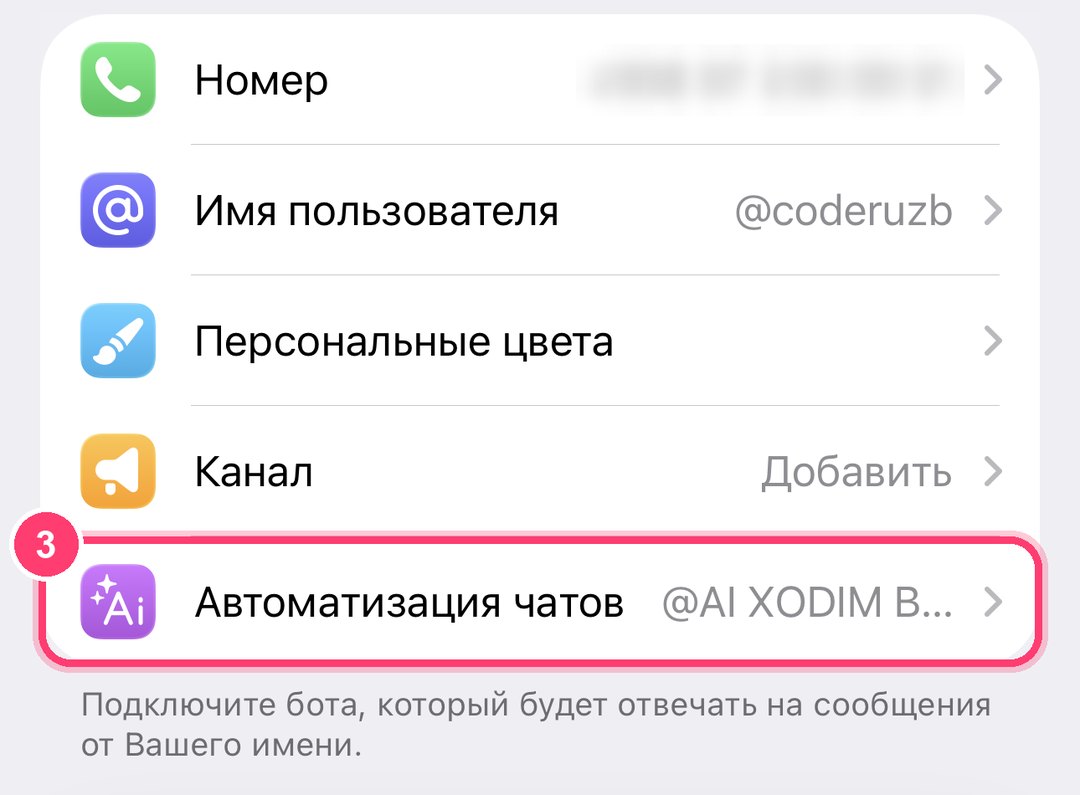
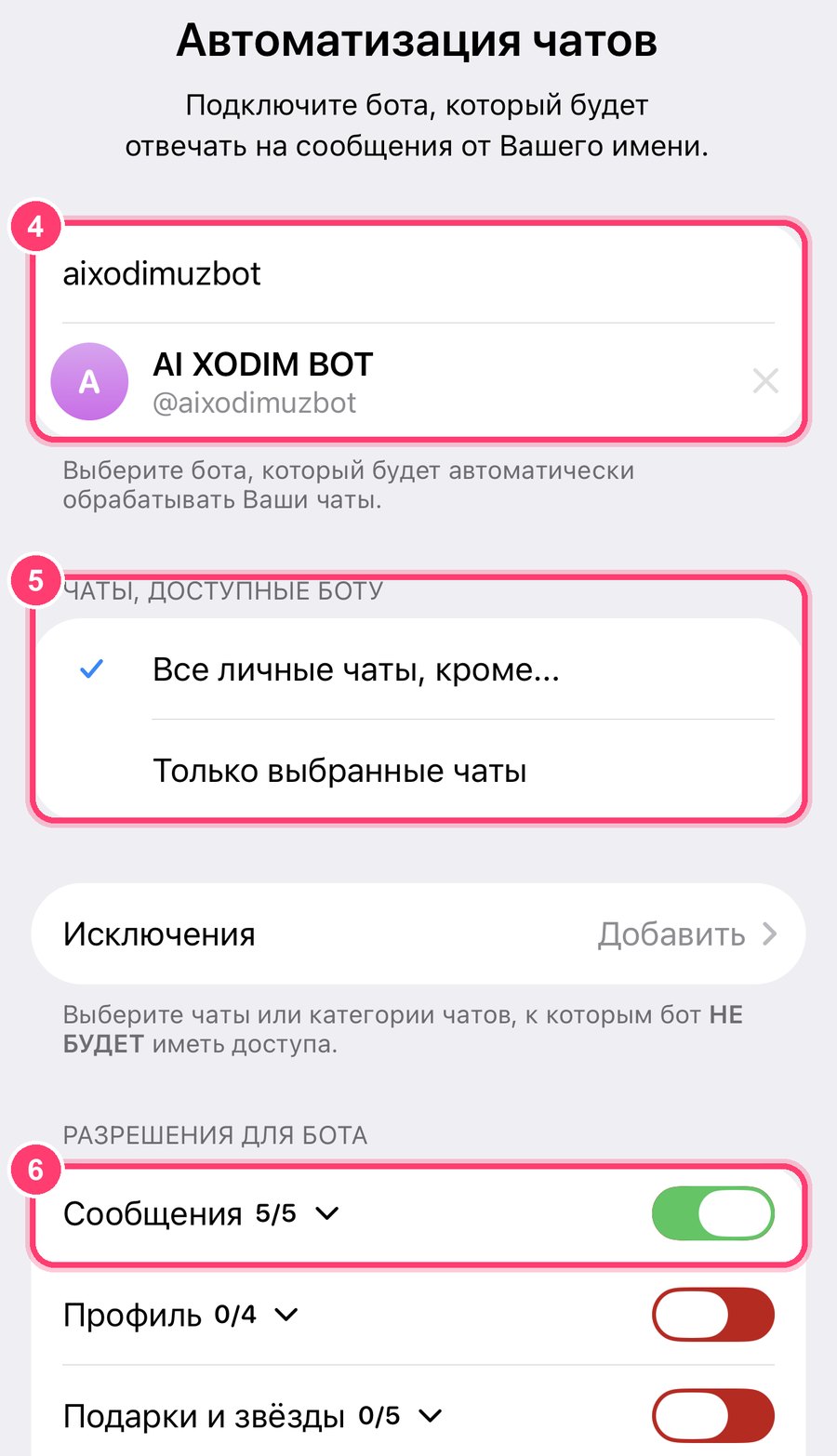
Telegram → Settings → Chat Automation (on iPhone: Settings → “Edit” → Chat Automation). Enter aixodimuzbot and select the bot.
Pick “All private chats except…” or “Only selected chats”, and switch on “Messages” in the bot's permissions.
In Claude, ChatGPT or Gemini: “Check my Telegram and draft replies.”
| You ask | What happens |
|---|---|
| “Check my Telegram and draft replies.” | The AI lists the chats waiting for you with a draft for each and sends the ones you approve. |
| “Who wrote to me today and still has no answer?” | A short list: who, when and what about. |
| “Tell Alex that Thursday at 3 works.” | The AI shows the exact text and sends it from your name after your yes. |
| “What did the supplier ask for this week?” | A summary of the new messages in that chat since you connected the bot. |
| “Draft polite refusals to both price requests.” | Two drafts, each in the language of its chat. |
A regular Telegram bot is a separate account that people have to find and write to. A secretary bot works the other way round: you connect it to your own account through Telegram's Chat Automation, and it helps with the conversations you already have — clients, suppliers, colleagues, friends.
Ai Xodim's secretary doesn't answer on its own. It hands the new messages to your AI — Claude, ChatGPT or Gemini, connected through the AI connector — and the AI prepares drafts. You read them, fix what you want and say which to send. Replies go out from your name.
It suits anyone whose Telegram is a work tool:
The bot is free to connect. Reading and answering through your AI is part of the AI connector in Ai Xodim Pro — $9.99 a month, the first 3 days free, no card needed. A detailed guide: AI secretary for Telegram: how to set it up.
Everyone who comments your keyword gets a DM from your account within seconds, plus a public reply under the comment.
Learn moreInstant answers in Instagram Direct by keyword, a default reply for everything else and a log of every incoming message.
Learn moreBefore sending the material, Ai Xodim politely asks the person to follow you — at most twice, then it sends the material anyway.
Learn moreFree Instagram analytics: growth, engagement rate by reach, audience — and a Reels report your own AI can explain.
Learn moreAn Instagram MCP server: your Claude, ChatGPT or Gemini reads analytics, comments and Direct, and acts when you say yes.
Learn moreConnect the bot in three minutes and ask: “Check my Telegram and draft replies.”