AI secretary for Telegram: let ChatGPT or Claude draft your replies
Connect your personal Telegram to ChatGPT or Claude: the AI finds chats waiting for you, drafts replies and sends only what you approve. No Premium needed.
In short
- An AI secretary for Telegram is a bot connected in Telegram's Chat Automation settings that lets your own AI — ChatGPT, Claude or Gemini — read new messages in the private chats you allow and reply from your account.
- With Ai Xodim you connect the bot @aixodimuzbot and ask your AI “Check my Telegram and draft replies”: it lists the chats waiting for you, drafts a reply in each chat's language and sends only the drafts you approve.
- Telegram Premium is not needed: in 2026 Telegram opened secretary bots to every account.
- The bot sees only new messages from the chats you allowed, can reply within 24 hours of the last incoming message, and stored messages are encrypted and deleted after 90 days.
Contents
- What an AI secretary for Telegram is
- Who needs it
- How it works: from “check my Telegram” to a sent reply
- How to set up an AI secretary for Telegram with Ai Xodim
- Prompts to try
- Auto-replies: when a rule should answer, not the AI
- Privacy and limits: what the AI can and can't see
- Tips for a secretary that really saves time
You come out of three meetings and Telegram shows 27 unread chats. A supplier wants a confirmation, a client asks for the price again, a colleague needs a yes or a no — and somewhere in between your mum asks whether you've eaten. Most of these need a two-line answer, but finding them, remembering the context and typing eats the whole evening.
An AI secretary for Telegram takes over the first part: it reads the new messages, works out who is waiting for you and drafts the replies. You read, correct and say “send”.
What an AI secretary for Telegram is
Telegram has a built-in setting called Chat Automation: you connect a bot that can read your private chats and reply on your behalf. For a long time this was part of Telegram Business and required Premium. In 2026 Telegram opened secretary bots to everyone, so a regular account is enough.
On its own, such a bot is just a pipe. The thinking is done by your own AI — ChatGPT, Claude or Gemini — through Ai Xodim:
- the bot @aixodimuzbot receives new messages from the chats you allowed;
- your AI reads them through the Ai Xodim AI connector when you ask it to;
- replies go out from your account and only after you approve them.
This isn't a chatbot for customers in a separate chat. It's your personal Telegram with an assistant that works when you call it. The full feature description is on the Telegram secretary page.
Who needs it
- Business owners and managers who get orders, questions and approvals in personal chats rather than in a CRM.
- Freelancers and consultants who juggle a dozen clients, each in their own thread.
- Sellers who answer “how much?”, “is it available?” and “where are you?” several times a day.
- Anyone who keeps seeing “read 2 days ago” under messages they meant to answer.
If you answer five messages a day, you don't need a secretary. If you answer fifty, it pays off on the first evening.
How it works: from “check my Telegram” to a sent reply
A typical exchange starts with one sentence to your AI: “Check my Telegram and draft replies.”
- The AI pulls the private chats where the last word is the other person's — the ones waiting for you — newest first, with their latest messages.
- It drafts a reply for each one in the language of that conversation: Russian for one person, Uzbek for another, English for a third.
- It shows the drafts as a numbered list and asks which ones to send.
- You answer the way you'd answer a human assistant: “Send 1 and 3. In 2, say we deliver on Friday, not Thursday. Skip 4.”
- The AI sends the approved replies from your account. Nothing goes out without your yes.
The loop takes a couple of minutes instead of an hour of scrolling. And because it's a normal conversation, you can keep asking: “What did Aziz want yesterday?” or “Which chats are about payment?”
How to set up an AI secretary for Telegram with Ai Xodim
You need an Ai Xodim account, an AI app connected to it and five minutes in Telegram.
- Create an account at ai-xodim.uz — a login and password, or Google / Apple.
- Connect your AI to Ai Xodim. In Claude, ChatGPT, Gemini CLI or any other app that supports MCP connectors, add a custom connector with the address
https://ai-xodim.uz/mcp, sign in to Ai Xodim and press “Allow”. There are one-minute video guides for Claude and ChatGPT. - Link your Telegram. In the Ai Xodim dashboard open Telegram and tap the one-time link. It opens @aixodimuzbot, which links your Telegram to your Ai Xodim account and sends you the same instructions with screenshots. If the link has expired, open a new one in the dashboard.
- Open Chat Automation in Telegram: Settings → Chat Automation. On iPhone it's Settings → Edit → Chat Automation.
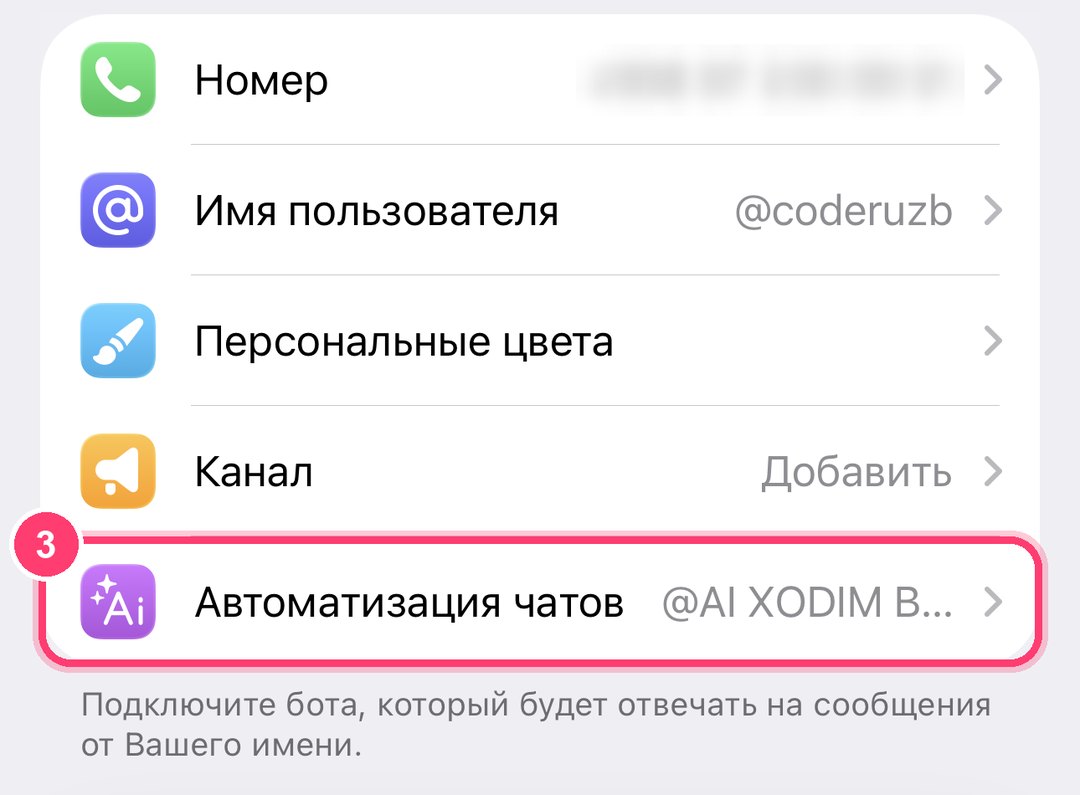
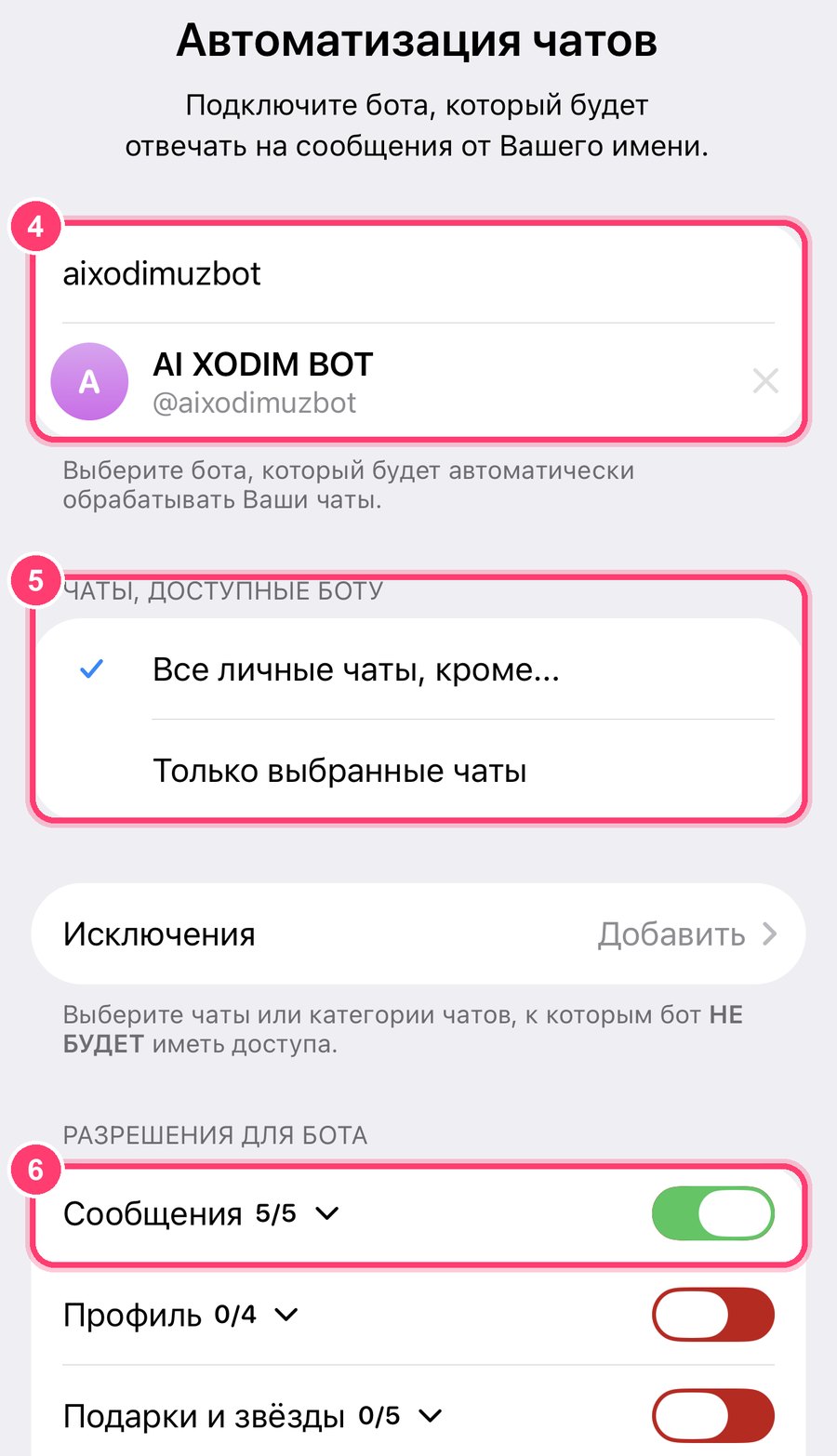
- Choose the bot and the chats. Type aixodimuzbot in the bot field, choose which chats it can see — all private chats except… or only selected chats — and switch on Messages in the bot's permissions.
- Ask your AI: “Check my Telegram and draft replies.”
The screenshots show the Russian Telegram interface on iPhone; in English the items are in the same places. If you don't see Chat Automation, update Telegram — in older versions the same setting lived under Telegram Business → Chatbots. Telegram allows one such bot per account, so if another bot is connected there, @aixodimuzbot replaces it.
Connecting the bot is free. The Telegram tools are part of the AI connector, so they need Ai Xodim Pro — $9.99 a month, the first 3 days free, no card needed.
Prompts to try
| You say | What the AI does |
|---|---|
| “Check my Telegram and draft replies” | Lists the chats waiting for you, drafts an answer for each and waits for your approval |
| “Who has been waiting for my answer the longest?” | Sorts the waiting chats by the time of the last message |
| “Summarize today's new messages in five lines” | Gives a short digest of what came in |
| “Which recent chats are about payment or invoices?” | Looks through the latest messages for money matters |
| “Reply to Dilshod that the meeting moves to 15:00” | Writes the reply, shows it and sends it after your yes |
| “Make draft 2 shorter and friendlier, then send it” | Rewrites it, shows the new text and sends it after your yes |
| “Check Telegram and Instagram Direct — what needs me today?” | Goes through both: the same connector also reads your Instagram Direct |
Auto-replies: when a rule should answer, not the AI
Not every message needs an AI. “How much is it?” and “Where are you?” get the same answer every time, and in the evening a polite “I'll reply in the morning” is enough. For that the Telegram secretary has auto-replies — switch them on in the dashboard or the app: Telegram → Auto-replies.
- Keywords. “price, cost” → your price list with a link. Match a part of a word or the exact word.
- One reply for everyone else: only to new people, once to everyone, once a day, or at the start of every conversation — it never repeats in the middle of one.
- Pause when you reply yourself. You wrote in a chat — yourself or through your AI — the bot keeps quiet there for 1 to 48 hours and stays out of the live conversation.
- Only outside working hours. You answer during the day, the bot in the evenings and on days off.
Replies go from your name, and the message stays unread so you still see it. Auto-replies, like AI replies, work with Ai Xodim Pro.
Privacy and limits: what the AI can and can't see
An assistant that reads your messages has to be predictable. Here is exactly what happens:
- Only the chats you allowed. You choose them in Telegram's Chat Automation settings and can change the list at any time.
- Only new messages. The bot receives messages that arrive after you connect it. Your old history is not loaded.
- 24 hours to reply. Telegram lets a secretary bot reply only in chats with an incoming message in the last 24 hours. Older chats are still visible to the AI, but you answer them yourself.
- Voice messages and video notes are transcribed into text on our own server (with Ai Xodim Pro), so the AI reads them like any message; names and numbers in a transcript are worth a second look.
- Encrypted and temporary. Message text is stored encrypted and deleted after 90 days.
- Nothing is sent without you. The AI is instructed to show the exact text and wait for your “yes” before sending anything.
- Easy to switch off. In the dashboard: Telegram → Disconnect — the stored chats are deleted. Then remove the bot in Telegram's Chat Automation settings. To cut off the AI itself: AI connector → Connected apps → Revoke.
Tips for a secretary that really saves time
- Start with “only selected chats”. Give it your work chats for a week, see how it drafts, then widen the list. Family and close friends can stay out.
- Teach it your tone once. For example: “I write short and friendly, no exclamation marks, first names with colleagues, formal with clients.” Your AI will follow it in every draft.
- Give it your rules. “Never promise discounts.” “Delivery questions — say Friday.” “Don't confirm meetings, ask me first.”
- Check names, dates and amounts before you approve. The AI drafts from the chat, but you know the context it doesn't.
- Batch it. Twice a day — after the morning meetings and at the end of the day — is usually enough. Urgent things you'll still see in Telegram as usual.
- Use the same AI for everything. Once it's connected, the same assistant answers questions about your Instagram too — see how to connect ChatGPT, Claude or Gemini to Instagram and what MCP is and why it matters for business.